

Comment System is very important for any Social Media platform as it is the only medium for Readers or Viewers to reach the Creator. It is useful to solve our queries and we also give our feedback about the Content. Social Media is incomplete without Comments as it is the public view and that is mandatory.
What we see nowadays is Few people write Irrelevant and Spam comments that show a negative impression to viewers. To minimize these activities we usually write a Comment Form Message regarding comments. One who wants to write a comment will see the Comment Form Message by the Creator and write according to the instructions.
Comment Form Message plays a very important role in Blogs also. It decreases Spam Comments and also the author instructs readers about maintaining a special format. It also improves the user experience and looks attractive.

What is a Comment Form Message?
Comment Form Message is an Instruction given by the Author to Readers about writing Comments. People first see the Comment Form Message and then write Comments according to it. It warns Spammers and shows clear notice to them about not writing Spam Comments. This message improves the effectiveness of the Comment System and helps users while Commenting.
Why is Comment Form Message Important?
Comment Form Message instructs readers about commenting on the post. The author can deliver his message about decreasing a particular type of comment or Spam comment. People become cautious before writing any irrelevant comment and the Author can also warn them through this Comment Form Message. A few other Benefits are:
- Decrease Spam Comments
- Improves User Experience
- Acts as a warning Message
- Maintains Comment Structure
- Create User-Friendly Comments
Steps to Change Comment Form Message (Blogger)
1. Open Blogger Dashboard
The first and the Simple step of Changing the Comment Form Message is to Open your blogger Dashboard by visiting https://www.blogger.com/ and choose your blog in which you want to change the Comment Form Message.
2. Click Settings and Scroll Down
The Next step is to click on settings in the menu bar on the left side as shown in the below picture. And also scroll down till you reach the next step.

3. Go to the Comments Section
When you scroll down as mentioned in the second step, you will find the Comments Section, where you can change settings related to Comments as Shown below Picture.

4. Click Comment Form Message
In the Comments Section, you will find the Comment Form Message at the last of the section. Click the Comment Form Message as Shown in the below Picture and Follow the Next Step.

5. Write your Comment Form Message
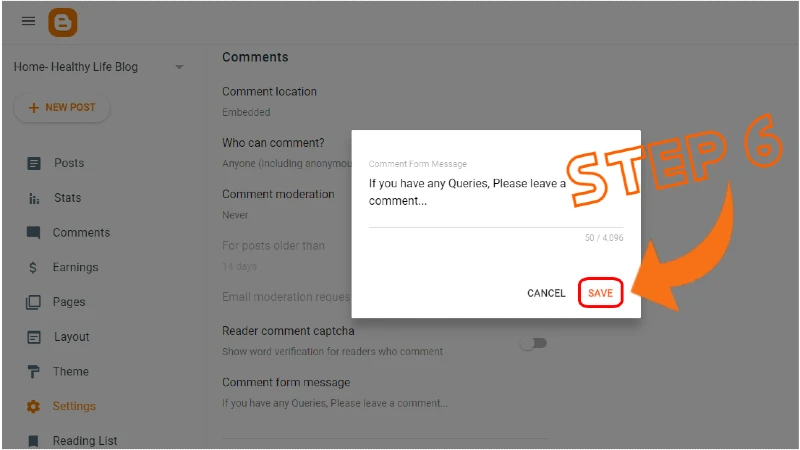
After Clicking on Comment Form Message, a popup will open and you have to write your Comment Form Message there as Shown below.

5. Click on Save
After writing your Comment Form Message, Click on SAVE. This is the final step of adding a Comment Form Message.
6. It's All Done!!
You now successfully added a Comment Form Message to your blog. You can check it by opening any post and going to the Comment option. You will see your Comment Form Message right above the Comments written there.

Conclusion
Now you successfully learned about Comment Form Message and you can easily add or change it. Comment Form Message is very important for both the Author and the Reader. It acts as a notice from the author to the reader while commenting.
If you find any difficulty regarding the Comment Form Message or have any issues, Please Leave a Comment...
Frequently Asked Questions (FAQ)
Q.1 Is Comment Form Message Compulsory to Add?
No, It only improves the user experience of our website and provides a message to Commenters from the Author.
Q.2 Does Comment Form Message Affect SEO and Ranking?
No, there is no connection between Comment Form Message to SEO or Ranking. You can change this according to your needs.
if you need a loan , a job or financial aid , kindly contact me now I know a good employer
ReplyDeleteI can also help you set up a profitable investment and recover lost assets. contact my email now : [email protected]
Strong overview of mobile gaming accessibility and structured app navigation. It’s refreshing to see content that explains both new-user onboarding and regular feature updates. Consistency in information really matters. For readers wanting an additional reference covering download steps and app ecosystem details, WinZO APP
ReplyDeleteI've been teaching a workshop on this topic for a few years now, and I'm always on the lookout for fresh perspectives to share with my students. Your post is going straight into next month's curriculum. The way you explained the third point is clearer than anything I've seen elsewhere, and I know my students will benefit from having multiple frameworks to draw from. I also appreciate that you included practical examples rather than just theoretical concepts—that's exactly what beginners need to bridge the gap between understanding and application. If anyone wants additional practice exercises, I've posted a bunch over at ALL YONO CODE that complement this post perfectly. Thanks for helping me make my workshops better.
ReplyDeleteThis is such a helpful guide! I’ve been blogging for a few years now, and I can’t stress enough how important a clear comment form message is. Before I added mine, I used to get random spam and off-topic comments all the time. Now it’s way cleaner, and readers actually take a moment to write something meaningful. The step-by-step screenshots make it super easy to follow—thanks for putting this together!
ReplyDeleteOn a side note, a clean comment section really builds trust, much like how a well-designed platform encourages genuine interaction. I’ve noticed the same thing with WINZO APP—it’s a skill-based gaming platform where the community actually engages in fun, competitive games like Ludo, Carrom, and cricket challenges. The full WINZO GAME collection is pretty impressive, and new users get a ₹888 bonus. It’s refreshing to see platforms that prioritize real user experiences over spam or clutter.
Keep up the great work with these tutorials!
This is a very informative and practical guide. Comment Form Message is often overlooked, but you explained clearly how it can improve user experience and reduce spam. The step-by-step process for Blogger makes it easy even for beginners to implement.
ReplyDeleteWhile exploring more platforms and user engagement strategies online, I also came across
https://hindi777.link/
which offers an interesting perspective on interaction and user behavior.
Thanks for sharing such useful insights!